Bringing PySide6 to iOS
Qt for Python meets Qt for iOS
Ece Cinüçen
 cinucen
 ecinucen
PySide6: Qt, from Python
- The same Qt classes, called from Python
- For each Qt module, Shiboken generates a binding that is compiled into a Python extension module:
PySide6.QtCorewraps Qt Core,PySide6.QtWidgetswraps Qt Widgets…
    app = QApplication(sys.argv)
    button = QPushButton("Click me")
    button.clicked.connect(lambda: print("clicked"))
    button.show()
    sys.exit(app.exec())
On desktop these are all shared libraries, loaded when your code imports PySide6.
Why iOS is different
- No Python on the device: the interpreter and standard library ship inside the app
- Qt for iOS is static: everything is linked into the app and registered in advance
- Everything is built and signed with Xcode, on a Mac
- Simulator and device are different platforms, so separate wheels
On iOS, Qt and PySide6 are linked statically
Desktop and Android
Qt and PySide6 are shared libraries.
import loads them when the app runs.
iOS
Qt for iOS is static, so PySide6 is static too.
What to link is decided when the Xcode project is generated.
Decided when the project is generated, not at import time.
Two steps: build the wheels, then deploy the app
1. Build the wheels (rarely)
    $ python tools/cross_compile_ios/main.py \
          --qt-install-path ~/Qt/6.12.0 \
          --arch arm64
- Needs Qt for iOS and Qt for macOS
- Optional: wheels come from the Qt Downloads page or
qtpip
2. Deploy your app (every time)
    $ pyside6-ios-deploy main.py \
          --wheel-pyside   pyside6-...-ios_arm64.whl \
          --wheel-shiboken shiboken6-...-ios_arm64.whl

    open deployment/ios_arm64/<App>.xcodeproj
- Generates an Xcode project in seconds
- The target comes from the wheel's platform tag
The building blocks
- Python 3.15 for iOS, from python.org (PEP 730)
- Qt for iOS: the official kit, static frameworks
- PySide6 + Shiboken, cross-compiled as static archives
- Your app, as plain Python files
App.app
pyside6-ios-deploy assembles these into the app.
How pyside6-ios-deploy works
What pyside6-ios-deploy works out
from your project's
.py and .qml filesfrom the kit's
.prl filesQt plugins, Python modules
What gets generated
project.pbxproj
What to link, and what to copy into the app
main.mm
What to register, then start Python
Info.plist
App name, bundle id, version, permission texts
project.pbxproj
What to link
    # QtWidgets.prl: what QtWidgets needs
    -framework QtGui         # other Qt modules
    -framework UIKit         # Apple frameworks
    libQt6BundledHarfbuzz.a  # Qt's bundled libraries
    qrc_qstyle_init.cpp.o    # Qt's built-in resources
The tool starts from your imports and reads each module's .prl, recursively. Qt's own metadata decides what gets linked.
What to copy
    App.app/
      App_bin                 # Qt + PySide6 + Shiboken (compiled code)
      Frameworks/             # Python.framework
      packages/               # third-party packages
      main.py                 # your code
One executable, plus everything else copied in by Xcode build phases.
main.mm: what to register
Qt: static plugins
Q_IMPORT_PLUGIN(QIOSIntegrationPlugin)
Linking libqios.a is not enough. The plugin must be imported by class name.
CPython: built-in modules
    PyImport_AppendInittab("PySide6.QtCore",
                           PyInit_QtCore);
There is no dynamic library to load. Every module must be registered before Py_Initialize.
main.mm: register, then start Python
1. Register
    Q_IMPORT_PLUGIN(QIOSIntegrationPlugin)
    Q_IMPORT_PLUGIN(QSvgPlugin)

    PyImport_AppendInittab("PySide6.QtCore",
                           PyInit_QtCore);
    PyImport_AppendInittab("PySide6.QtSvg",
                           PyInit_QtSvg);
Everything that is linked gets registered.
2. Start Python
    Py_InitializeFromConfig(&config);
    PyRun_SimpleFile(fp, "main.py");
Qt's entry point calls main(), which runs your main.py.
Info.plist
App metadata
    CFBundleDisplayName
    CFBundleIdentifier
    CFBundleShortVersionString
From pysidedeploy.spec, or the matching command-line options.
Permissions
    NSCameraUsageDescription
    NSMicrophoneUsageDescription
    NSBluetoothAlwaysUsageDescription
    NSContactsUsageDescription
    NSCalendarsUsageDescription
    NSLocationWhenInUseUsageDescription
All six, in every app: PySide6 itself imports the six Darwin permission plugins.
Third-party Python packages
1. Find them
    # pysidedeploy.spec
    [ios]
    packages = numpy,requests
Listed in the spec, or found by scanning your imports.
2. The tool installs them for iOS
    # run by pyside6-ios-deploy, on every deploy
    pip install --target site-packages \
        --platform ios_..._arm64_iphonesimulator \
        --only-binary :all: \
        --extra-index-url <BeeWare index> ...
iOS wheels from PyPI, or BeeWare's index for compiled packages.
Demo: Tetrix in the Simulator
tetrix.pypyside6-ios-deployThe same app on a real device
- Same
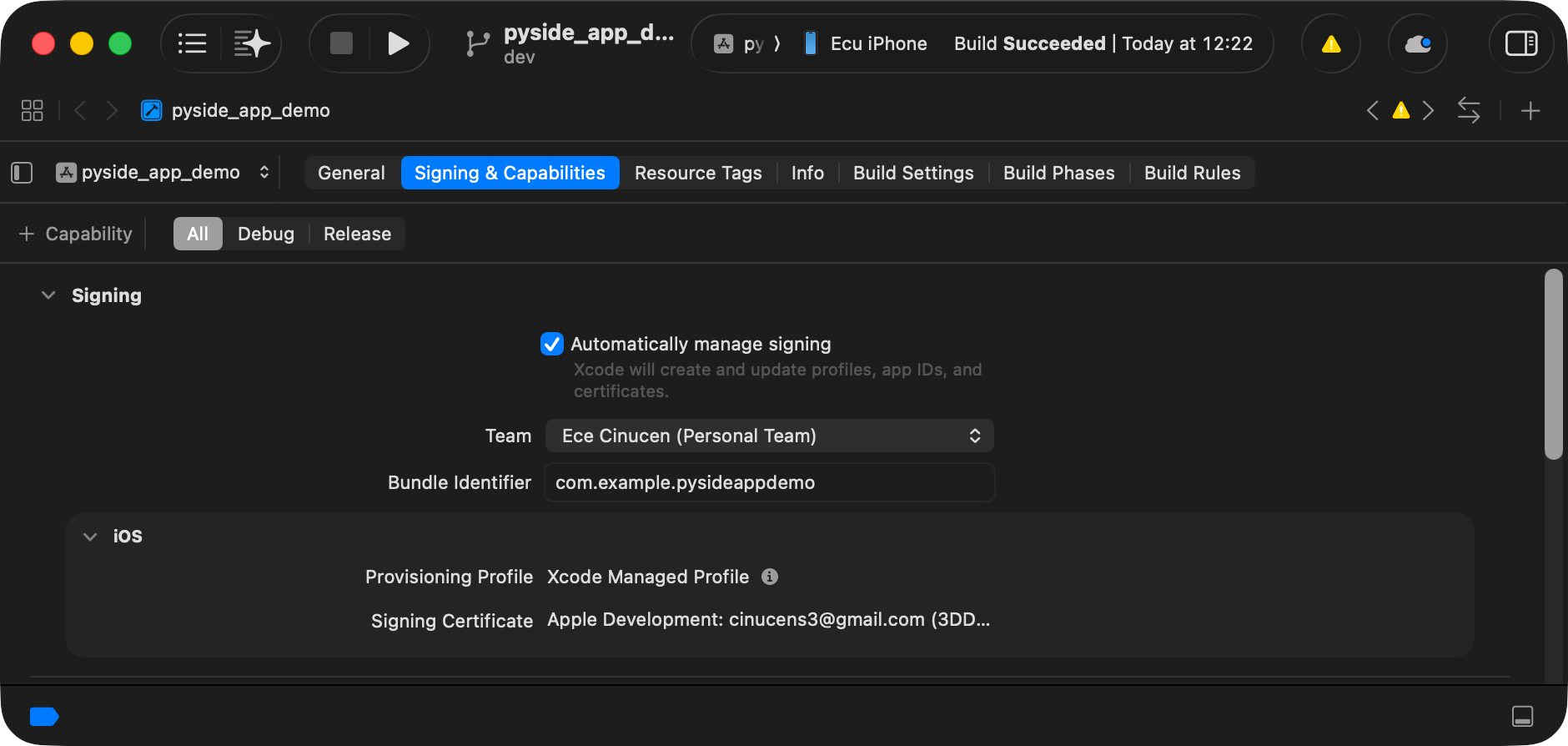
main.py, nothing changed - Build with the device wheels (
ios_arm64) - Pass your Apple Developer team:
--team-id - Xcode signs and installs it
Status
- Works: simulator and physical device
- Works: Widgets and QML apps
- Part of PySide 6.12, released together with Qt 6.12
- App Store submission: not verified yet, feedback welcome
Known limits
- Official Qt for iOS kit only: static, framework layout. Custom builds are not supported
- The module set follows the kit. A module missing from it is dropped silently, and fails at
import - One wheel set per target, tied to one Python version
- Third-party packages need an iOS wheel, on PyPI or BeeWare's index
Roadmap
- Qt 6.12 is out; PySide 6.12 ships this support
- A real diagnostic when a Qt module is dropped
- More examples
Try it, break it, tell us
- Docs: https://doc.qt.io/qtforpython-6/deployment/deployment-pyside6-ios-deploy.html
- Bug tracker: bugreports.qt.io (project PYSIDE)
- Source and examples: code.qt.io/cgit/pyside/pyside-setup
- Slides: github.com/cinucen/PySide6-iOS-QtCS2026
Questions?
Ece Cinüçen
cinucen
ecinucen

github.com/cinucen/PySide6-iOS-QtCS2026